Arduino webserver

Arduino webserver: "


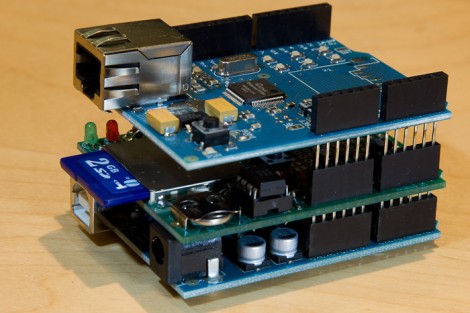
The Arduino platform should be perfect for throwing together a lightweight webserver because of the availability of quality shields that take care of the hardware for you. As [Ovidiu Predescu] found, there are a few hiccups along the way and he’s put together a guide that covers the workarounds. Specifically, using an Ethernet shield and data logging shield at the same time produces a bus conflict which he sidesteps by cutting the CS pin trace on the data logging board and moving it to a different pin. There is also a bug with one of the chips on the Ethernet shield that is fixed using a similar method. So if you’re not just going to etch your own webserver hardware maybe this is the next best thing.


"

Comments

Popular posts from this blog

Microsoft Keyboard macro Sleep

1) Open up your "Microsoft Keyboard" properties (aka Intellipoint ) 2) Select the macro key you want to assign it to, and hit Configure 3) Select the option "Start a program, Web page, or file" and hit next 4) Type this into the box : Rundll32.exe Powrprof.dll,SetSuspendState Sleep Njoy ! source :  http://www.tomshardware.co.uk/forum/5145-63-windows-sleep-macro

Change Your IP Address From Windows PowerShell #windows10

step 1 : run ISE as Administrator step 2 : run ipconfig command choose adapter to set eg. "Ethernet" step 3 : run netsh : netsh interface ip set address name=”[Adapter Name]” static [IP] [Subnet Mask] [Default Gateway] eg. netsh interface ip set address name=”Ethernet” static 192.168.0.200 255.255.255.0 192.168.0.240 or use DHCP :  netsh interface ip set dnsservers name=”Ethernet” source=dhcp netsh interface ip set address name=”Ethernet” source=dhcp Njoy !

How to Fake/Trick Your Netbook's Screen Resolution to Higher

Get 1024x768 or higher resolution on your netbook via this registry hack ! Go to the Start menu and type in  regedit  in the search box, then hit Enter At the top menu, go to Edit then Find... and search for " Display1_DownScalingSupported " Change each instance you find (you'll likely find 2 results for this) from "0" to "1". Make sure you change e very found instance , because otherwise the hack won't work (in my experience). Once done, restart the system. Njoy ! Source :  http://mobileoffice.about.com/od/netbooks/a/How-To-Change-Your-Netbooks-Screen-Resolution.htm